Home | Touch | UI
Target Page
A “target” is a receiver of the commands that can be executed from a HTML panel, or provider of data that can be send to the HTML panel.
In the Targets page users can define one or more targets. Targets is a running instance of Fly Elise-ng software that has enabled CMDNET interface. Targets can be added by their IP address and post to which the CMDNET interface is connected.
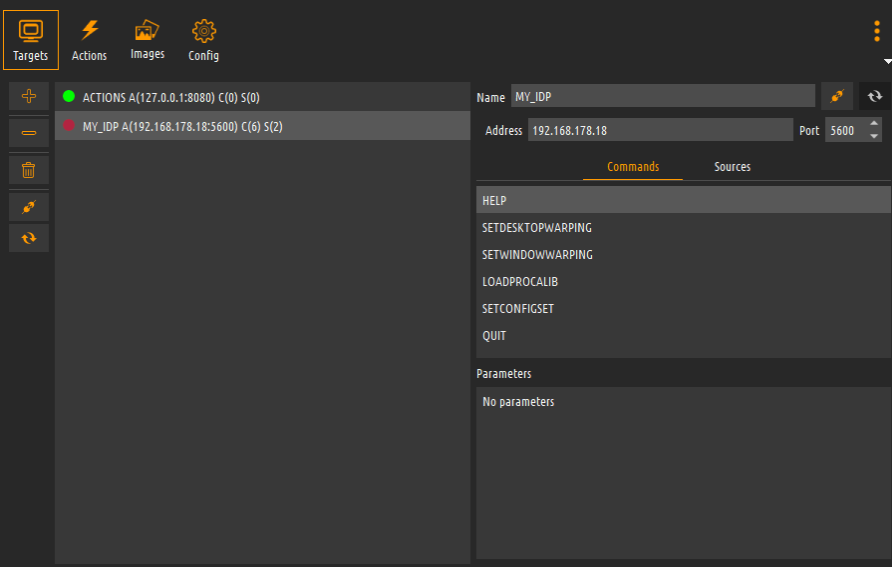
The state if the target is connected or disconnected. When the CMDNET interface becomes available (the Fly Elise-ng software is started) then the Immersive Touch Panels will automatically connect to the target. Each target has a unique name that can be used to uniquely identify the target of the command from the HTML touch panel.
On the right site of the screen, for each target, the list of the supported commands and sources are lusted for the selected target. After connecting to the target, the software will query the target for the supported commands, sources and the corresponding parameters. Those will be used for designing and building the HTML panels.
The list of the supported commands and sources can be retrieved explicitly by pressing the refresh target button, net to the target name.