Home | Touch
Immersive Touch Panels
Introduction
Every Fly Elise-ng software has a comprehensive set of features that can be used via the Windows Desktop graphical user interface (GUI). Next to the standard GUI interface, every software also supports an alternative network and socket based interface, the CMDNET interface, to be able to control the software remotely.
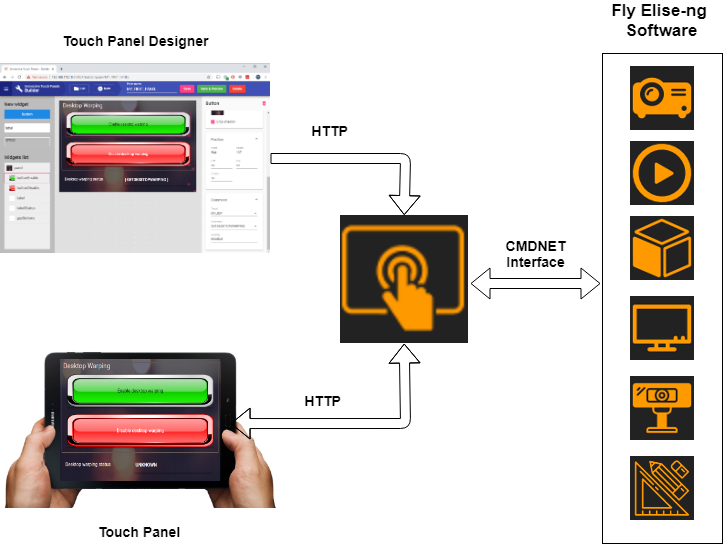
The CMDNET interface is a simple socket based, command interface for easy integration of the Fly Elise-ng software control features with any existing control system. The set of supported CMDNET commands per software product can be found in the corresponding software user manual. Integrating the existing control systems with the CMDNET interface requires low level programming and integration skills.
Immersive Touch Panels software provides an alternative solution for defining, and using touch panels from any web enabled device with screen: telephone, tablet, PC, etc. Instead of using expensive professional touch control software and hardware, one can use Immersive Touch Panels to visually and interactively create professional touch panels which can be used to directly control all available Fly Elise-ng software which support the CMDNET interfaces.
Immersive Touch Panels is a gateway between the software with CMDNET interface and the user of the software. All the CMDNET interface commands and arguments are made available to the user. User can define HTML based touch panels and place buttons or other controls to directly execute the CMDNET commands with their parameters.
Services
Immersive Touch Panels provides 3 types of services:
- Gateway to the software with CMDNET interface
- Web based interface for defining HTML based touch panels
- Web interface for loading the defined HTML based touch panels and executing the CMDNET commands.
Users can use any HTML/HTTP enabled device to define their own control panels that can be used from any device to control the software.
System requirements
The following is the required minimal configuration:
- PC with 2.0 Ghz or higher processor (32bit or 64 bit)
- 2 Gb or more RAM
- A moderate graphics card (NVIDIA or AMD/ATI)
- A network connection
Old User Guide
Download and check Old Immersive Touch Panels User Guide.