Home | Display | Simulators
Flight Simulator Integration
The Simulators tab configures perspective corrections and dynamic camera positions for major simulation platforms.
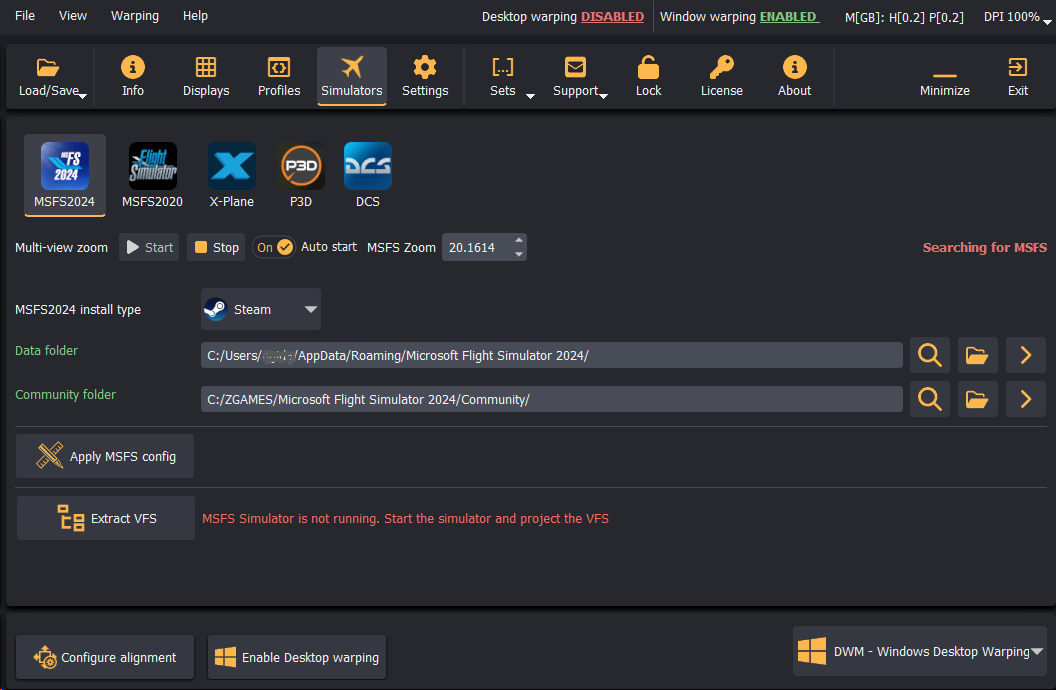
Supported Flight Simulators
Immersive Display PRO provides native integration with:
- Microsoft Flight Simulator 2024 (MSFS 2024)
- Microsoft Flight Simulator 2020 (MSFS 2020)
- Laminar Research X-Plane (v11 / v12)
- Lockheed Martin Prepar3D (P3D v4 / v5 / v6)
- DCS World (Digital Combat Simulator)
MSFS 2024: VFS Projector & Package Extractor
The VFS Challenge
MSFS 2020 stored aircraft configuration files locally on the hard drive, making them easy to edit. In MSFS 2024, aircraft assets are streamed on demand through a compressed Virtual File System (VFS) and are not stored locally in an uncompressed state.
To apply correct multi-projector perspective frustums, three key files must be configured:
cameras.cfg(per aircraft)model.cfg(per aircraft)UserCfg.opt(global simulation settings)
Using the VFS Extractor
Immersive Display PRO includes a specialized extraction utility to override streamed data:
- Launch MSFS 2024 and navigate to the Simulators tab in Immersive Display PRO.
- Specify the Data folder and Community folder paths.
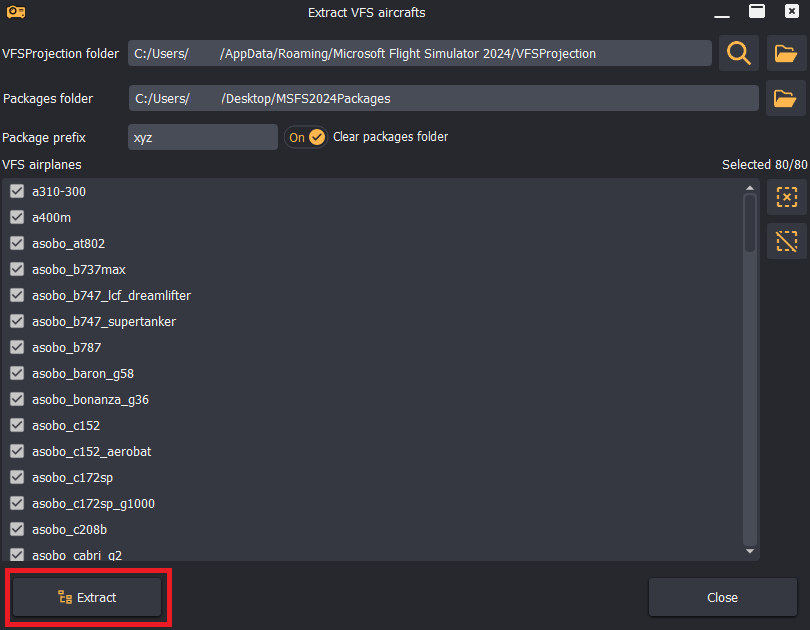
- Click Extract VFS to launch the aircraft selector window.
- Check the aircraft you want to configure (e.g.,
asobo_c172sp,asobo_b737max, etc.). - Click Extract. The utility extracts the configuration files and generates an overlay package in the Community folder.
- Click Apply MSFS Config to import camera viewpoint data calculated by Immersive Calibration PRO directly into the generated overlay packages.
Multi-View Zoom Lock
MSFS 2020 and 2024 can reset camera zoom levels during view updates or menu interactions.
- In the Simulators tab, check Auto start next to Multi-view zoom and set the target Zoom level (calculated during calibration).
- Immersive Display PRO runs a background service that keeps the simulator locked to the exact optical zoom level needed for the screen geometry.