Home | Designer | UI
Main Window
The main window is the central workspace of Immersive Designer PRO. It combines the 3D viewport, toolbars, and configuration panels so that you can design, modify, and validate your multi-projector or LED panel setup in real time.
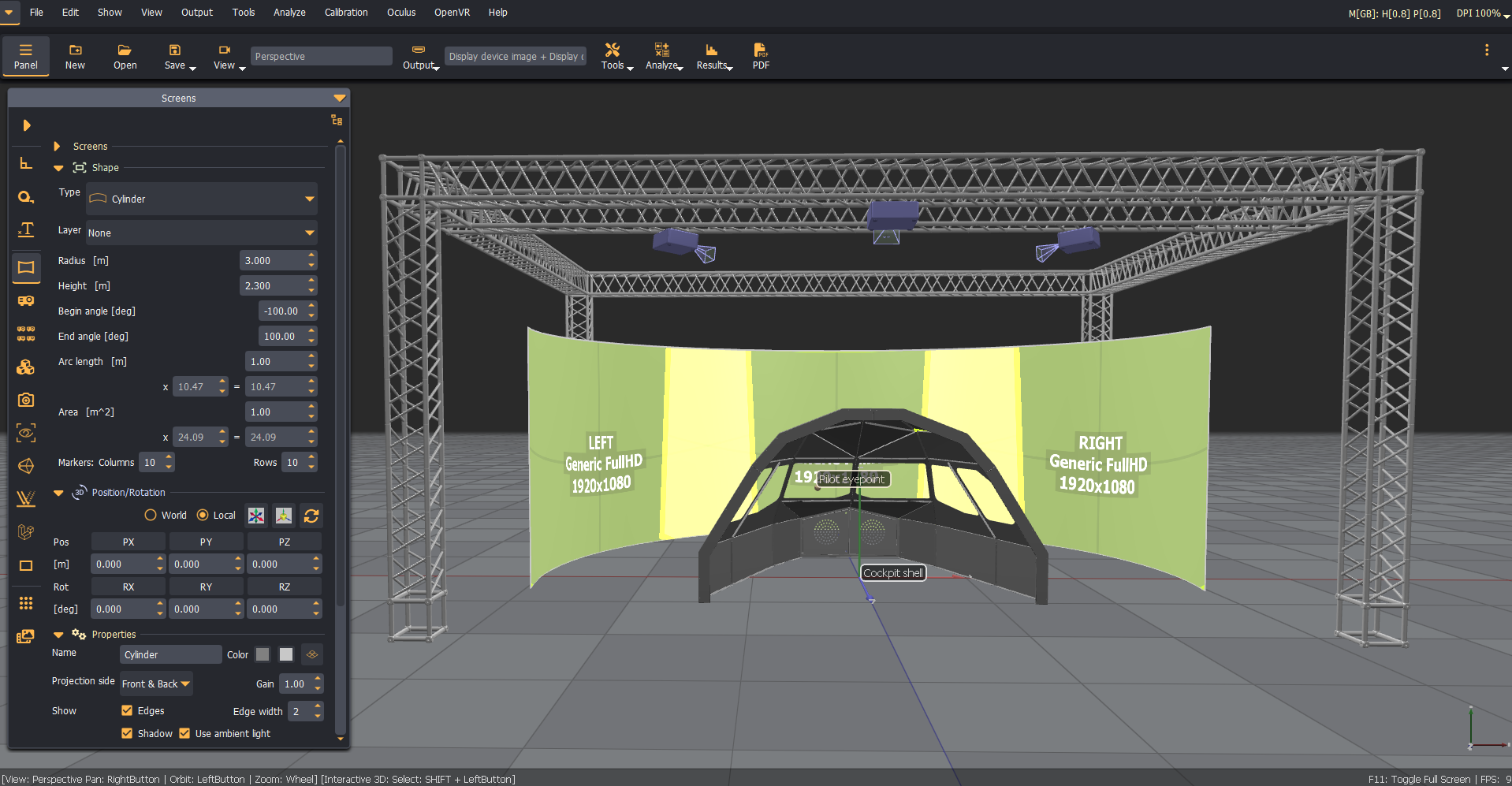
Layout overview
The main window is divided into the following areas:
| Area | Description |
|---|---|
| Menu bar (top) | Top-level access to all software functions and operations. |
| Toolbar (top) | Quick access to the most frequently used function, such as Views, Tools, Analyze, Results, PDF, etc. |
| 3D viewport (centre) | 3D viewport is interactive area where the screen, projectors, cameras, and other objects are rendered. Supports interractive rotate, pan, and zoom navigation. |
| Configuration panel (left) | Configuration panel is context-sensitive settings for the selected scene element (screen properties, projector properties, camera properties, object placement, ect.). |
| Analysis panel (left) | Analysis panel shows the detailed analysis results. |
| Status bar (bottom) | Displays context information such as the current view mode and helpful hints while you interact with the scene. |